
Download Bitwarden – Free Secure Password Manager for Windows, Mac, Android & iOS
Overview
In a world where digital identities are constantly under threat, a reliable password‑management tool is no longer a luxury—it’s a necessity. Bitwarden positions itself as a comprehensive, open‑source password manager that combines robust encryption with an intuitive user experience. Whether you’re an individual looking to replace sticky notes and browser‑saved passwords, or a small team needing shared vaults, Bitwarden delivers a secure, cross‑platform solution that scales with your needs. The platform encrypts every piece of data locally on your device before it ever touches the cloud, meaning only you hold the decryption key. This end‑to‑end encryption model, paired with zero‑knowledge architecture, ensures that even Bitwarden’s own servers never see your plaintext passwords.
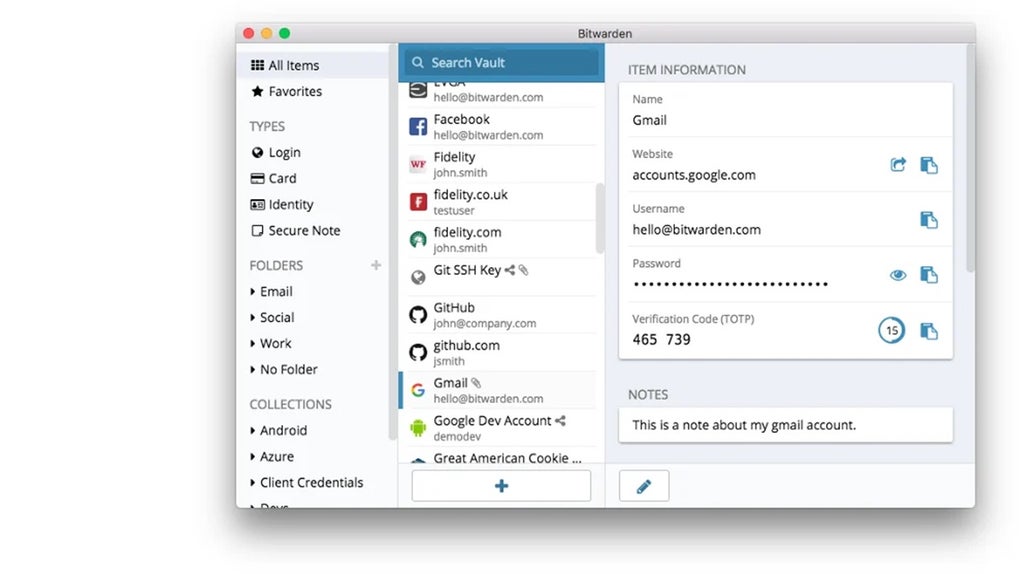
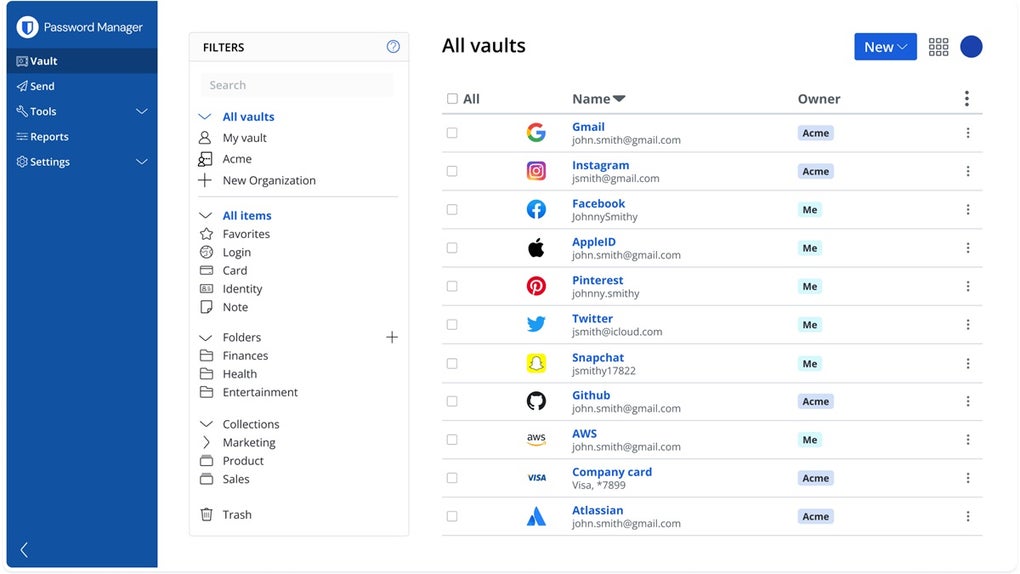
The service offers a free tier that already includes password generation, secure notes, credit‑card storage, and unlimited device sync. For power users and businesses, premium subscriptions unlock advanced features such as encrypted file storage, emergency access, and detailed security reports. Bitwarden’s web‑app, desktop clients, browser extensions, and mobile apps are all designed with the same core principles: simplicity, security, and accessibility. The UI follows a clean, minimalist design that makes adding, editing, and retrieving credentials a breeze, while the underlying cryptographic protocols (AES‑256, PBKDF2, Argon2) guarantee industry‑standard protection.
Beyond the core password‑vault, Bitwarden emphasizes privacy. The company is transparent about its source code, undergoes regular third‑party audits, and adheres to GDPR and CCPA compliance. Regular automatic updates keep the software patched against emerging threats, and the community‑driven roadmap means new features are often added based on real user feedback. In short, Bitwarden offers a secure, free, and flexible tool that can protect your digital life across Windows, macOS, Linux, Android, and iOS.
Key Features & Benefits
- End‑to‑End Encryption: All vault data is encrypted locally with AES‑256 before it reaches Bitwarden’s servers.
- Cross‑Platform Sync: Seamlessly sync passwords across Windows, Mac, Linux, Android, iOS, and any modern web browser.
- Password Generator: Create strong, unique passwords with customizable length, symbols, and character sets.
- Secure Sharing: Share logins, notes, or cards with team members or family using encrypted collections.
- Biometric & Multi‑Factor Authentication: Unlock the vault with fingerprint, Face ID, or hardware security keys (U2F, WebAuthn).
- Secure Notes & Credit Card Vault: Store sensitive information beyond passwords, all encrypted with the same master key.
- Browser Extensions: Auto‑fill credentials on Chrome, Firefox, Edge, Safari, and Opera without leaving the browser.
- Self‑Hosted Option: Deploy Bitwarden on your own server for maximum control over data residency.
- Open‑Source Transparency: Full source code available on GitHub, audited by independent security researchers.
- Free Tier & Affordable Premium: Core functionality is free; premium upgrades start at $10 / year.
Each of these features is built to reduce friction while enhancing security. For example, the password generator not only creates complex passwords but also saves them directly into the vault, eliminating the need to copy‑paste insecurely. Secure sharing works with granular permissions, letting administrators decide who can view, edit, or share items within an organization. The self‑hosted variant is particularly appealing to enterprises that must comply with strict data‑sovereignty regulations, as it allows the entire stack to run behind a corporate firewall.
Beyond the headline features, Bitwarden’s continuous update cycle ensures that users benefit from the latest security patches and usability improvements. The app’s lightweight footprint means it runs smoothly even on older hardware, while its web‑based interface provides a fallback for any device with a modern browser. Altogether, these capabilities make Bitwarden not just a password manager, but a holistic digital‑identity protection tool.
Installation, Setup & First‑Time Use (Including Compatibility)
Getting started with Bitwarden is intentionally straightforward, regardless of whether you’re on Windows, macOS, Linux, Android, or iOS. Follow these steps to download, install, and configure your first vault:
1. Download the Application
Visit the official Bitwarden website and click the “Download” button that matches your operating system. The site automatically detects Windows, macOS, or Linux for desktop clients, while mobile users are redirected to the Apple App Store or Google Play Store. For browser extensions, select the appropriate store (Chrome Web Store, Firefox Add‑ons, Edge Add‑ons, Safari Extensions).
2. Install the Software
- Windows: Run the
.exeinstaller, accept the license agreement, and choose the default installation path. - macOS: Open the
.dmgfile, drag the Bitwarden icon into the Applications folder, and launch from Launchpad. - Linux: Use the provided Snap package (
snap install bitwarden) or download the AppImage for universal compatibility. - Android & iOS: Tap “Install” in the respective app store, then open the app once the download completes.
3. Create or Import a Vault
On first launch, you’ll be prompted to either create a new master password or import an existing vault from another password manager (LastPass, 1Password, etc.). The master password is the only secret you need to remember; it never leaves your device. For added security, enable a password‑strength meter and consider using a passphrase that combines random words with symbols.
4. Enable Multi‑Factor Authentication (MFA)
Navigate to the “Settings & Security” tab, then select “Two‑step Login.” Choose from authenticator apps (Google Authenticator, Authy), hardware keys (YubiKey), or email verification. MFA significantly reduces the risk of unauthorized vault access.
5. Sync Across Devices
Log in to the same Bitwarden account on each device. Sync happens automatically in the background, but you can manually trigger it from the app’s menu. For teams, create collections and assign members to share specific passwords securely.
6. Browser Extension Configuration
After installing the extension, pin it to your toolbar, log in with your master password, and enable auto‑fill. Most extensions also support “Vault Unlock” shortcuts (e.g., Ctrl+Shift+L) for rapid access.
Bitwarden supports Windows 10/11, macOS 10.13+, Linux distributions (Ubuntu, Fedora, Debian), Android 6.0+, iOS 13+, as well as Chrome, Firefox, Edge, Safari, and Opera browsers.
Overall, the installation and onboarding process takes under ten minutes, after which you’ll have a fully encrypted vault ready to protect every login, note, and card you store.
Pros, Cons & Frequently Asked Questions
Pros
- Free tier includes all essential password‑management features.
- Open‑source code fosters transparency and community trust.
- End‑to‑end encryption with zero‑knowledge architecture.
- Cross‑platform availability ensures seamless sync.
- Strong MFA options, including hardware security keys.
- Self‑hosted version for enterprises needing on‑premises control.
- Regular automatic updates keep security current.
Cons
- Premium features (encrypted file storage, advanced reports) require a paid subscription.
- Interface, while clean, may feel less polished than some commercial rivals.
- Self‑hosting requires technical expertise and server maintenance.
- Browser extension auto‑fill occasionally lags on older browsers.
Frequently Asked Questions
Is Bitwarden really free?
Yes. The core password‑manager, including unlimited password storage, sync across all devices, and browser extensions, is completely free. Optional premium plans add features like encrypted file storage and advanced two‑factor options.
How secure is Bitwarden’s encryption?
Bitwarden uses AES‑256 encryption, PBKDF2‑SHA256 (or Argon2 for premium accounts) for key derivation, and RSA‑2048 for sharing. All encryption occurs locally on your device, and the service follows a zero‑knowledge model, meaning Bitwarden never sees your plaintext data.
Can I use Bitwarden on multiple devices simultaneously?
Absolutely. After logging in, your vault syncs automatically across all installed clients—desktop, mobile, and browser extensions—so you can access passwords on any device at any time.
What happens if I forget my master password?
Because Bitwarden never stores or transmits your master password, it cannot be recovered. If you forget it, you’ll need to reset your vault, which will delete all stored data. This is why creating a strong yet memorable master password and enabling emergency access (premium) is essential.
Is there a self‑hosted version of Bitwarden?
Yes. Bitwarden offers a self‑hosted Docker image that can be deployed on your own servers, giving you full control over data residency and compliance. The self‑hosted edition includes the same feature set as the cloud version.
Overall Rating: 5/5 – Bitwarden delivers a robust, free password‑management solution with enterprise‑grade security and an open‑source ethos that is hard to beat.
Conclusion & Call to Action
When it comes to safeguarding your digital credentials, Bitwarden stands out as a rare blend of security, accessibility, and affordability. Its end‑to‑end encryption, zero‑knowledge architecture, and cross‑platform sync ensure that you can trust the vault with your most sensitive information without sacrificing convenience. Whether you’re a solo user who needs a reliable password generator or a growing team looking for secure shared collections, Bitwarden scales to meet the demand. The free tier already packs a feature set that rivals many paid competitors, while the premium and self‑hosted options provide the flexibility required by businesses with stricter compliance needs.
Ready to take control of your passwords? Download Bitwarden now for Windows, macOS, Linux, Android, or iOS and start protecting your online identity with a tool that puts privacy first. Remember to enable multi‑factor authentication and consider the premium plan for added peace of mind. Secure your digital life today—because a strong password manager is the first line of defense against cyber threats.



.png)



